
Get your API key
Getting Your API Key
You can create and manage API authentication tokens directly in the BioLM Console.
Your API key allows you to access BioLM programmatically through the HTTPS API or Python SDK.
Go to the API Keys page
Visit https://biolm.ai/console/user/api-keys/
Generate a new key
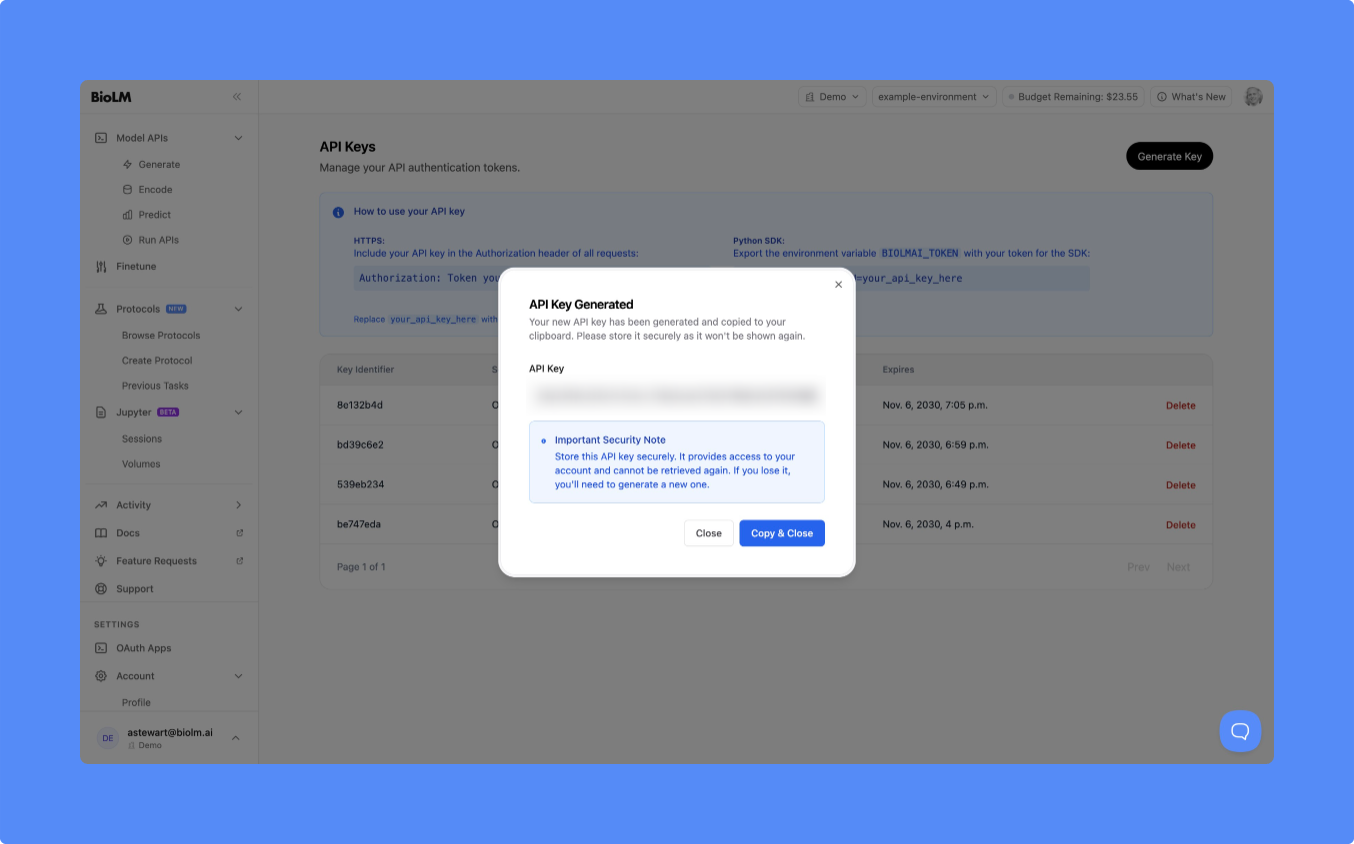
Click Generate Key in the top right corner.
A new key will appear in the list with its identifier, scope, and expiration date.
Note: Copy your key once. You cannot view it again after closing the modal.
Use your API key
Your API key authenticates any request you make to BioLM — whether through the HTTPS API, Python SDK, or Jupyter.
HTTPS
Include your API key in the Authorization header of every request:
curl https://api.biolm.ai/v1/models \
  -H "Authorization: Token YOUR_API_KEY"
Python SDK
Set your API token as an environment variable before using the SDK:
export BIOLMAI_TOKEN=YOUR_API_KEY
You can also set it directly inside Python:
from biolmai import biolm

biolm.configure(api_key="YOUR_API_KEY")
After configuring, all SDK calls automatically use your credentials.
Using in BioLM Jupyter (Built-In)
Your environment automatically loads BIOLMAI_TOKEN if you've set it in your console or environment.
No additional setup is required once the variable is exported.
Managing keys
You can revoke or regenerate keys anytime from this page.
If you suspect a key is compromised, delete it immediately.